

Table of Contents
- How to Request a Prescription Refill Online
- Using Prescription Refill Mobile Apps for Chronic Conditions
- How to Use Patient Portals for Refills and Medication Management
- Managing Multiple Prescriptions Online Safely
- Understanding Turnaround Times and Delivery for Online Refills
- Security, Privacy, and HIPAA Compliance in Online Refill Systems
- Common Issues with Online Refills and How to Troubleshoot
- The Role of Licensed Providers and Pharmacists in Virtual Refills
Managing Chronic Medication Refills Online: A Step-by-Step Guide
Last Updated: August 4, 2026
Managing chronic medication refills online has transformed how patients maintain consistent access to essential treatments. At Chemistway, we understand that refilling prescriptions shouldn't require multiple phone calls, waiting on hold, or making unnecessary trips to the pharmacy. This guide covers the practical steps for managing chronic medication refills online, from accessing your patient portal to troubleshooting common obstacles that delay your medications.
How to Request a Prescription Refill Online
Requesting a prescription refill online follows a consistent three-step process across most pharmacies and patient portals. Routine refills typically process within 24-48 hours.
Step 1: Access Your Patient Portal or Pharmacy Account
Log into your pharmacy's website or mobile app using your prescription number, date of birth, and pharmacy location. For hospital or clinic-based pharmacies, access refills through the health system's patient portal using HIPAA-compliant security that encrypts your prescription data.
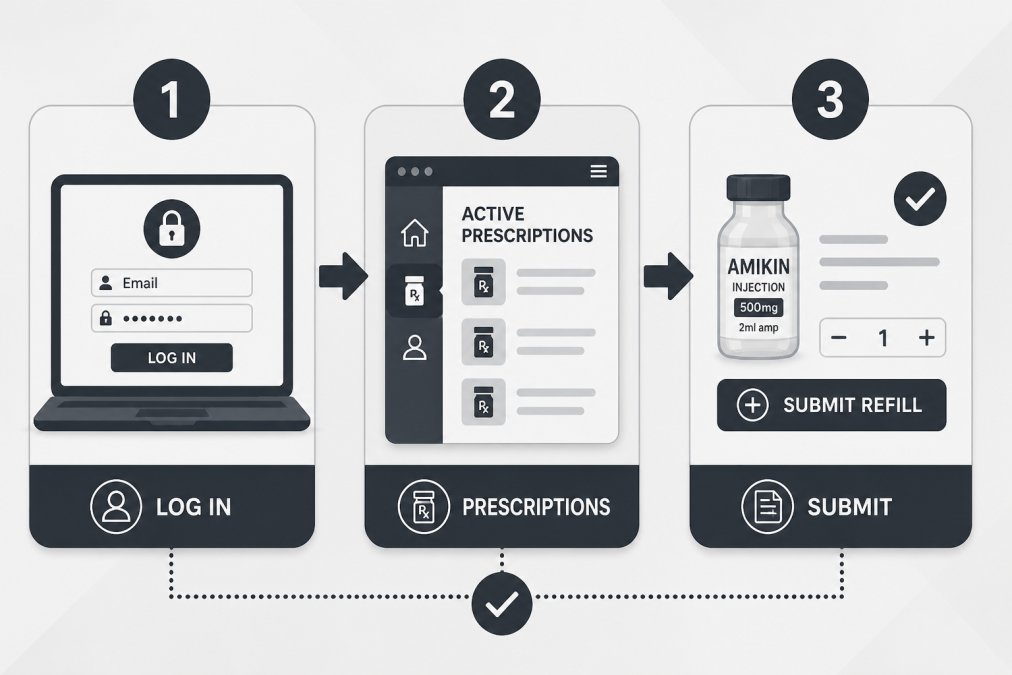
Step 2: Locate Your Active Prescriptions
Once logged in, find the section labeled "Active Prescriptions" or "My Medications." Each prescription shows the medication name, dosage, and refills remaining. If refills show zero, your licensed provider must authorize additional refills before processing.
Step 3: Submit Your Refill Request
Click the refill button and confirm your delivery preference. Mail delivery typically takes 5-10 business days, while store pickup is usually ready within 24 hours. The pharmacy sends your request to your provider for verification, and you'll be notified when your refill is ready.
Using Prescription Refill Mobile Apps for Chronic Conditions
Mobile apps designed for medication management offer convenience beyond basic refill requests. These apps consolidate your prescriptions, set automated reminders, and help track medication adherence, a critical factor in managing chronic diseases effectively.
Key Features to Look For
Prioritize automatic refill scheduling, medication interaction warnings, insurance coverage tracking, and direct messaging with your pharmacist. Some apps integrate with your health insurance, showing your out-of-pocket costs before you fill the prescription.
Chemistway's online platform includes features allowing you to request refills, view your prescription history, and access certified pharmacists through secure messaging. Managing multiple chronic medications in one place reduces confusion and helps prevent missed doses.
Automated Reminders and Adherence Tracking
Medication adherence, actually taking your medications as prescribed, directly impacts how well your chronic condition is controlled. The best apps send customizable reminders at medication time and track whether you've logged your dose, creating a record you can share with your doctor. This adherence tracking helps your licensed provider understand whether your condition is controlled by your current medication regimen or whether adjustments are needed.
How to Use Patient Portals for Refills and Medication Management
Patient portals are comprehensive platforms where you can view your entire prescription history, check dosage information, track refill dates, and communicate with your healthcare team about your medications.
Setting Up Your Portal Account
Create a secure account through your healthcare provider's website using your patient ID number, date of birth, and email address. Choose a strong password with uppercase and lowercase letters, numbers, and special characters. Many portals now offer two-factor authentication for extra security.
Viewing Your Prescription History and Dosage Information
Once active, access your complete prescription history showing every medication filled, including dates, quantities, dosages, and refills remaining. This consolidated view prevents accidental duplicate prescriptions and helps you remember medication timing and interactions. Many portals also show insurance coverage status and flag generic alternatives that cost significantly less.
| Portal Feature | What It Shows | Why It Matters |
|---|---|---|
| Prescription History | Every medication filled, dates, quantities | Prevents duplicate prescriptions and tracks adherence |
| Dosage Information | How often to take, with food or not | Ensures correct medication timing |
| Refills Remaining | Authorized refills left before provider approval needed | Tells you when to request new authorization |
| Insurance Coverage | Whether medication is covered, out-of-pocket cost | Helps you plan costs and compare generic options |
| Refill Status | Pending, approved, ready for pickup | Lets you know when your medication is available |
Managing Multiple Prescriptions Online Safely
Patients with chronic conditions often take multiple medications. Managing these safely online requires organization, attention to detail, and awareness of potential drug interactions.
Organizing Your Medications by Refill Date
List each medication and its refill cycle. Some need refilling monthly, others every three months. Stagger your refill requests to reduce confusion and ensure you always have a supply on hand. Many patient portals let you set up automatic refills for routine medications, eliminating the need to manually request each month.
Create a simple calendar or spreadsheet showing each medication, its dosage, and the expected refill date. Some apps do this automatically, sending you a reminder when each medication is due for refill.
Medication Reconciliation and Drug Interaction Checks
Medication reconciliation means reviewing your complete medication list to ensure every medication is necessary, dosed correctly, and not duplicated. This is especially important when you see multiple doctors. Before requesting refills online, review your full medication list and remove any medications you've stopped taking.
Drug interaction checks are equally critical. When managing multiple chronic medications, the risk of harmful interactions increases. Your pharmacist reviews these interactions, but you should too. Most online pharmacy platforms flag known interactions and alert you when a new medication might interact with your existing ones.
Understanding Turnaround Times and Delivery for Online Refills
How quickly you receive your medication depends on whether you're using mail delivery or pickup, whether your provider needs to authorize the refill, and whether your insurance requires prior authorization.
For routine refills of established chronic medications, most pharmacies process requests within 24 hours. Mail delivery typically takes 5-10 business days, while store pickup is usually ready within 24 hours. Request refills before you run out to avoid gaps in your medication.
Prior authorization adds 1-3 business days. Your pharmacist can often start this process as soon as you request the refill. Chemistway offers mail delivery, and for certain medications, expedited options that reduce wait times for patients managing chronic conditions.
Security, Privacy, and HIPAA Compliance in Online Refill Systems
Your prescription information is protected health information (PHI) under the Health Insurance Portability and Accountability Act (HIPAA). Any system handling your medication data must encrypt it, secure it against unauthorized access, and limit who can view it.
Data Encryption and Secure Messaging
When you log into a patient portal or pharmacy app, your connection should be encrypted, you'll see a padlock icon in your browser's address bar and the URL will start with "https://". Secure messaging within your portal uses the same encryption. Ask your pharmacy which security measures they use. Reputable systems employ multi-factor authentication, regular security audits, and strict access controls.
Insurance Information and Out-of-Pocket Cost Transparency
When you enter your insurance information into an online portal, that data is stored securely and used only to verify your coverage and calculate your out-of-pocket costs. Your insurance company receives information about what medications you're filling, which is necessary for them to process claims and determine your copay.
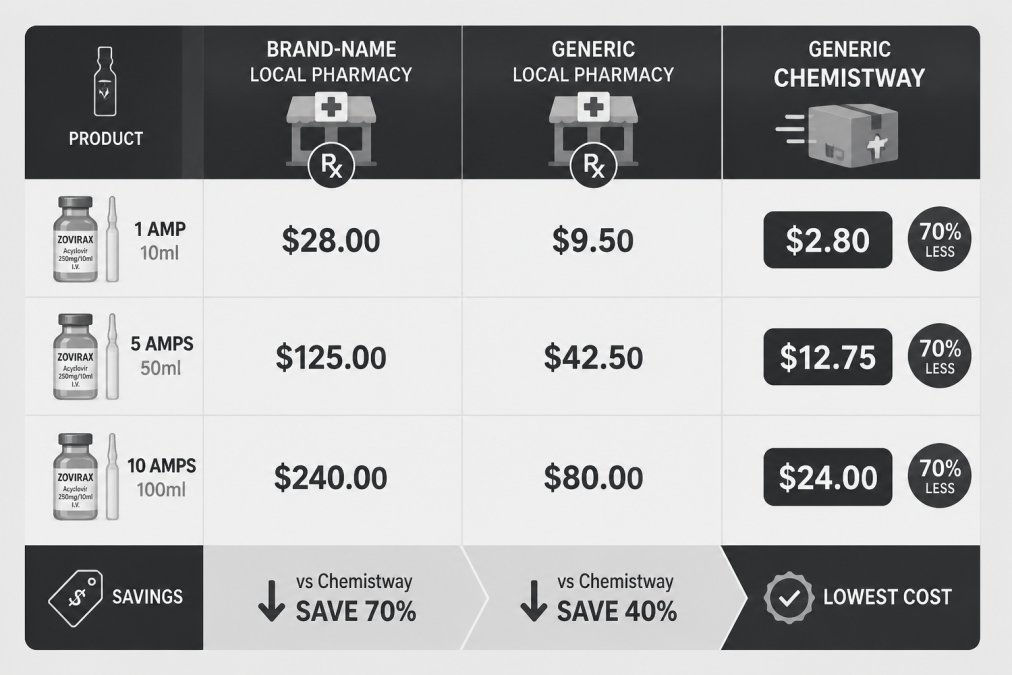
Many online platforms now show your out-of-pocket cost before you fill the prescription. This transparency lets you compare prices between pharmacies and decide whether to use a generic alternative, which is often significantly cheaper than brand-name medications.
Common Issues with Online Refills and How to Troubleshoot
Refill Request Denied or Pending
A denied refill usually means your provider hasn't authorized refills, your insurance coverage has lapsed, or there's a pharmacy network issue. If the denial says "No Refills Remaining," contact your provider's office to authorize additional refills, which typically takes 24-48 hours. If the message mentions insurance, check your coverage status and update your information in the pharmacy portal.
Pending refills usually resolve within 24-48 hours. If a refill stays pending longer, call your pharmacy directly.
Prior Authorization Requirements
Some medications require prior authorization from your insurance company before the pharmacy can fill them. When your refill is denied due to prior authorization, your pharmacist typically handles the request automatically, adding 1-3 business days. If you're running low on medication, ask your pharmacy to expedite the request or provide a short-term supply while authorization is pending.
Pharmacy Network and Insurance Coverage Issues
Confirm that your pharmacy participates in your insurance plan before requesting a refill. Most insurance websites let you search for in-network pharmacies by location. Chemistway works with most major insurance plans and shows your coverage and out-of-pocket costs upfront.
The Role of Licensed Providers and Pharmacists in Virtual Refills
Online refill systems work because licensed providers and pharmacists maintain clinical oversight. These professionals verify that your medications are safe, appropriate, and not duplicated or interacting dangerously.
How Pharmacists Review Your Prescription Online
When you submit a refill request online, your pharmacist reviews it before dispensing. They check that the medication is appropriate for your condition, the dosage is correct, and no dangerous interactions exist with your other medications. For routine refills, this review is usually straightforward. However, if something has changed, the pharmacist may flag the refill and contact your provider for clarification.
Pharmacists also check insurance coverage during their review. If your insurance has changed or lapsed, the pharmacist identifies this and contacts you before dispensing.
When You Need Clinical Oversight for Chronic Disease Management
Routine refills don't require your provider to review every detail. However, if your chronic condition isn't well-controlled, you experience new side effects, or you've had significant life changes, your provider should review your medication regimen.
Many patients don't realize they can message their provider through the patient portal to discuss medication concerns without scheduling an office visit. At Chemistway, certified pharmacists are available 24/7 through secure messaging for questions about your medications, potential interactions, or side effects.
Managing chronic medication refills online transforms a tedious, time-consuming process into something you can handle in minutes from your home. The systems are secure, pharmacists review your medications for safety, and your prescriptions arrive on schedule when you understand how to use them effectively. Start by setting up your patient portal account, organize your medications by refill date, and request refills before you run out. For patients managing multiple chronic conditions, Chemistway's platform integrates refill management, pharmacist consultation, and cost transparency into one simplified experience. Create a free account to see how much easier managing your medications can be.
Frequently Asked Questions
How do I set up automatic prescription refills online for my chronic medications?
Most patient portals and pharmacy platforms allow you to enable automatic refills directly in your account settings. Navigate to your prescription list, select the medication you want to refill automatically, and choose your refill frequency (typically every 28-30 days). You can also contact your pharmacy or licensed provider to request automatic refill authorization. Many platforms send automated reminders before each refill is processed, giving you time to cancel if needed. Automatic refills reduce the risk of missed doses and medication adherence issues common with chronic conditions.
What should I do if my online prescription refill request is denied?
A denied refill request usually means your licensed provider hasn't approved the renewal, your insurance requires prior authorization, or you've reached your refill limit. First, check your patient portal or secure message from your pharmacy for specific details. Contact your healthcare provider to request a new prescription if the original has expired. For insurance denials, ask your pharmacist whether prior authorization is needed and if your provider can submit it electronically. If switching to a generic medication or using a pharmacy network outside your plan, discuss cost-comparison options with your pharmacist. Most issues resolve within 24-48 hours once addressed.
Can I manage multiple chronic medications through a single patient portal?
Yes, most modern patient portals allow you to view and manage all your prescriptions from one account. You can track refill dates, dosages, and pharmacy information for each medication in one place. This helps prevent drug interactions and ensures you don't accidentally request duplicate refills. Set up a personal medication list within your portal and organize refills by date to stay on top of your chronic disease management. Some platforms also let you set different refill schedules for different medications, which is helpful if your medications run on different cycles.
Is it safe to use online prescription refill services, and how is my data protected?
Legitimate online prescription refill platforms are HIPAA compliant and use encryption to protect your personal and health information. Your data remains secure when transmitted between your provider, pharmacy, and insurance company through certified systems. Look for platforms that display security certifications and privacy policies before signing up. Avoid sharing passwords, and use secure internet connections when accessing your accounts. Licensed pharmacists review your prescriptions before dispensing, and your health records integrate across authorized providers to catch potential drug interactions. Always verify the pharmacy is licensed and accredited before submitting refill requests.
This article was written using GrandRanker


0 comments