

Table of Contents
- Why Verifying Online Pharmacy Legitimacy Matters
- Step 1: Check NABP Pharmacy Verification Status
- Step 2: How to Check Pharmacy State Board License
- Step 3: Identify Signs of an Illegal Online Pharmacy
- Step 4: Verify Secure Website Indicators and Data Privacy
- Step 5: Confirm Pharmacist Availability and Consultation
- Step 6: Report Suspicious Pharmacy Websites
- Verification Checklist for Online Pharmacy Safety
Last Updated: August 18, 2026
Why Verifying Online Pharmacy Legitimacy Matters
Buying medication online offers genuine convenience, no waiting rooms, no last-minute trips. But that same convenience creates risk. Counterfeit medications, unverified sellers, and data theft are real threats. The stakes are high: a fake medication could delay treatment for a serious condition, while a data breach could expose your entire medical history.
How do you know if an online pharmacy is legitimate? The answer isn't guesswork. There are specific, verifiable steps you can take to confirm a pharmacy is licensed, accredited, and operating legally. The verification process we outline here is the same one we recommend to anyone considering purchasing medication online.
Step 1: Check NABP Pharmacy Verification Status
The National Association of Boards of Pharmacy (NABP) maintains the gold standard for online pharmacy verification. If a pharmacy isn't listed as accredited by NABP, that's a major red flag.
What NABP Accreditation Means
NABP accreditation means a pharmacy has met strict standards for licensing, quality, and regulatory compliance. It means the pharmacy has been vetted by a credible third party and is subject to ongoing oversight. For online pharmacies specifically, NABP accreditation is the clearest signal of legitimacy.
How to Search the NABP Database
The NABP operates a free verification tool called Pharmacy Checker. Here's how to use it:
- Visit the NABP Pharmacy Verification database
- Enter the pharmacy name or website URL
- Check the results for accreditation status
- Look for the NABP Seal on the pharmacy's website; it should link directly to the verification database
If the pharmacy claims to be accredited but doesn't appear in the NABP database, it's not accredited. Don't proceed with that pharmacy.
Step 2: How to Check Pharmacy State Board License
Every legitimate pharmacy must be licensed by the state board of pharmacy where it operates. This is a legal requirement. Checking state licensing is your second layer of verification.
Finding Your State's Board of Pharmacy
Each state maintains its own board of pharmacy with a public database:
- Search "[Your State] Board of Pharmacy" in a search engine
- Look for the official government website (usually ends in .gov)
- Find the section labeled "License Verification" or "Search Licensed Pharmacies"
- Enter the pharmacy name or license number
When you find the pharmacy in the state database, verify the license is current, the license type matches what the pharmacy claims, and there are no disciplinary actions against the pharmacy.
Step 3: Identify Signs of an Illegal Online Pharmacy
Not every illegitimate pharmacy fakes NABP accreditation or state licensing. Many operate openly with obvious red flags. Learning to spot these warning signs can save you from scams, counterfeit drugs, and identity theft.
Red Flags That Signal Danger
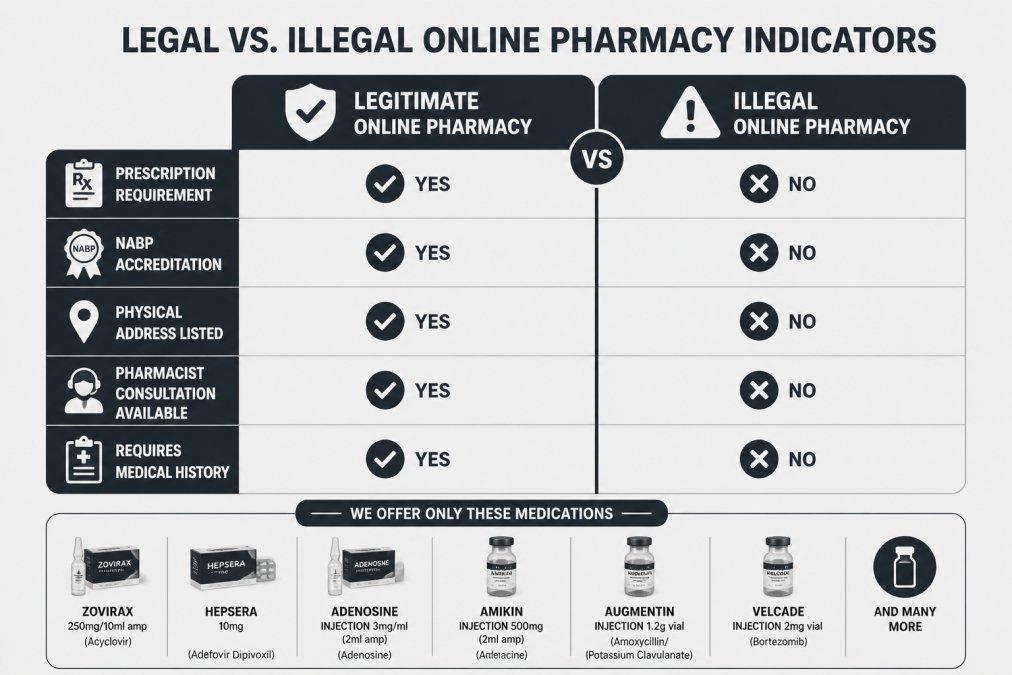
No prescription requirement. Legitimate pharmacies require a valid prescription from a licensed healthcare provider for prescription medications. If an online pharmacy sells prescription drugs without asking for a prescription, it's operating illegally.
Unrealistic pricing. Prices that seem too good to be true usually are. Extreme discounts on brand-name medications often indicate counterfeit products. Legitimate pharmacies offer reasonable savings but don't undercut market rates by 80-90% across the board.
No physical address listed. Legitimate pharmacies display a physical address and phone number prominently. If a website only offers an email contact with no verifiable location, that's a warning sign.
No pharmacist available for consultation. Legal pharmacies must have a licensed pharmacist available to answer questions about medications.
Spelling errors and poor website design. Many illegal pharmacies operate with low budgets and show sloppy website design and grammatical errors.
No privacy policy or unclear data handling. Legitimate pharmacies publish clear privacy policies explaining how they protect your personal and health information.
Prescription Requirements and Legitimate Practice
A legitimate pharmacy cannot sell prescription medications without a valid prescription from a licensed healthcare provider. This is federal law. Some online pharmacies offer legitimate online consultations where a licensed doctor or nurse practitioner reviews your medical history and issues a prescription if appropriate. This is legal. What's not legal is selling prescription medications without any medical review.
Step 4: Verify Secure Website Indicators and Data Privacy
Your prescription information is sensitive. It reveals your medical conditions, medications, allergies, and health history. Before you enter any personal information on a pharmacy website, verify the site uses proper security measures.
HTTPS, SSL Certificates, and Encryption
A secure website uses HTTPS (Hypertext Transfer Protocol Secure) and an SSL certificate. HTTPS encrypts data transmitted between your browser and the website. When you see "HTTPS://" in the address bar, the connection is encrypted.
To verify a website's SSL certificate:
- Look for the padlock icon in your browser's address bar
- Click the padlock to view certificate details
- Confirm the certificate is current and the domain name matches the pharmacy's actual website
If there's no padlock, the connection isn't encrypted. Do not enter personal information on an unsecured website.
Privacy Policy and Personal Health Information Protection
A legitimate pharmacy publishes a clear privacy policy explaining what personal and health information they collect, how they use it, who they share it with, and how long they retain it. Before you create an account, read the privacy policy. Also verify the pharmacy complies with HIPAA (Health Insurance Portability and Accountability Act), which sets federal standards for protecting health information.
Step 5: Confirm Pharmacist Availability and Consultation
Federal law requires that a pharmacist review every prescription before it's filled. Legitimate online pharmacies make their pharmacist consultation process clear and accessible. You should be able to ask questions about your medication, get answers about potential drug interactions, and contact a pharmacist after you receive your medication if questions arise.
Check how the pharmacy handles pharmacist consultations:
- Is there a phone number to speak with a pharmacist directly?
- Is there a chat or messaging system?
- Does the website explain the pharmacist review process?
- Are pharmacists available during reasonable hours?
If you can't find clear information about how to reach a pharmacist, that's a red flag.
Step 6: Report Suspicious Pharmacy Websites
If you encounter an online pharmacy that fails verification checks or displays multiple red flags, report it. Your report helps protect other patients and supports regulatory enforcement against illegal operations.
Where to File a Complaint
FDA (Food and Drug Administration): Report through the FDA's MedWatch program. Include the pharmacy's website URL, what you observed, and any transactions.
State Board of Pharmacy: Report to the state board in the state where the pharmacy claims to operate.
NABP: If a pharmacy falsely claims NABP accreditation, report it directly to NABP.
Internet Crime Complaint Center (IC3): If you suspect fraud or identity theft, file a report with the FBI's Internet Crime Complaint Center.
When you file a report, include the pharmacy's website URL, claimed business name, specific red flags you observed, any transaction details, and screenshots if possible.
Verification Checklist for Online Pharmacy Safety
Use this checklist every time you consider using a new online pharmacy. Go through each step before you place an order.
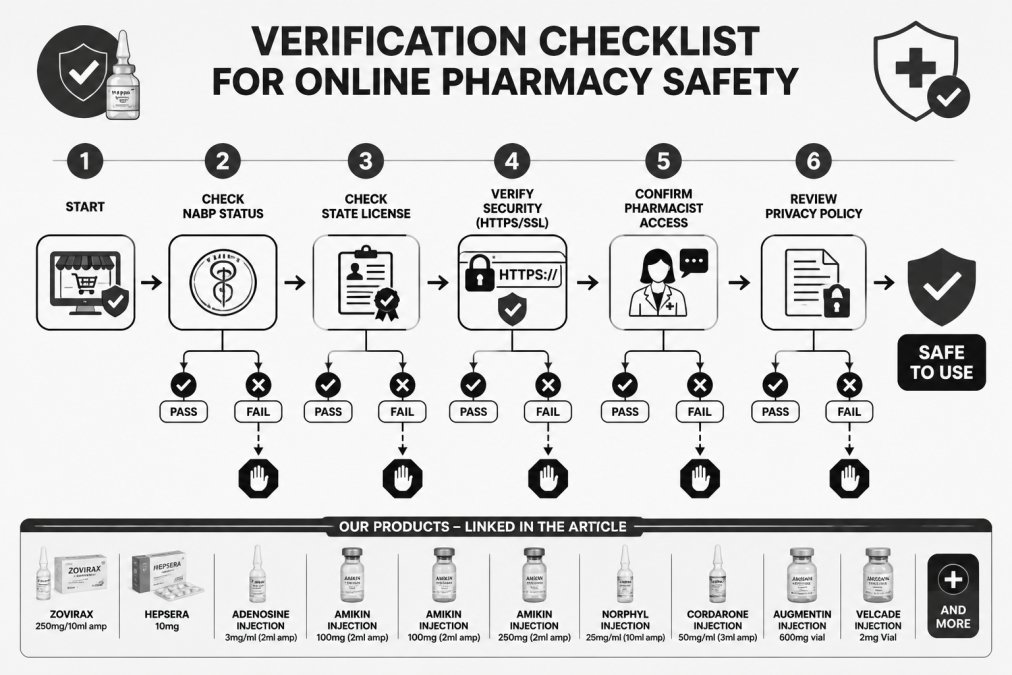
| Verification Step | What to Check | Pass / Fail |
|---|---|---|
| NABP Accreditation | Search pharmacy in NABP database; confirm current accreditation status | ☐ Pass ☐ Fail |
| State License | Verify pharmacy is licensed in the state where it operates; confirm license is current | ☐ Pass ☐ Fail |
| Prescription Requirement | Confirm pharmacy requires valid prescription for prescription medications | ☐ Pass ☐ Fail |
| Pharmacist Availability | Verify licensed pharmacist is available for consultation before and after purchase | ☐ Pass ☐ Fail |
| Website Security | Confirm HTTPS connection and valid SSL certificate; look for padlock icon | ☐ Pass ☐ Fail |
| Privacy Policy | Review privacy policy; confirm HIPAA compliance and clear data handling practices | ☐ Pass ☐ Fail |
| Physical Address | Confirm pharmacy displays verifiable physical address and phone number | ☐ Pass ☐ Fail |
| Realistic Pricing | Compare prices to market rates; extreme discounts are a red flag | ☐ Pass ☐ Fail |
If any step shows "Fail," do not use that pharmacy.
Verifying an online pharmacy before you buy takes 15-20 minutes. That time investment protects your health, your privacy, and your money. Accredited online pharmacies make this verification process straightforward, they're licensed, accredited, and transparent about their operations. When you use a verified pharmacy, you can focus on managing your health instead of worrying about whether your medication is real or your data is safe.
Verified pharmacies like Chemistway offer a range of services to meet different health needs. Whether you're looking for Prescription Home delivery, Vitamins and minerals, or specialized medications like Anti Cancer Medicines, a legitimate accredited pharmacy provides the same rigorous verification and professional oversight.
Start with the NABP database search. If the pharmacy appears there with current accreditation, you've already eliminated the highest-risk options. Then verify state licensing and check the website security. Follow the checklist, and you'll have confidence in your choice.
Frequently Asked Questions
How can I verify an online pharmacy is legitimate before placing an order?
Start by checking the pharmacy's NABP accreditation status through the NABP website. Next, verify its state pharmacy license through your state's board of pharmacy database. Confirm the site uses HTTPS encryption, displays a physical address and phone number, requires a valid prescription, and offers access to a licensed pharmacist. These steps form the foundation of verifying online pharmacy legitimacy and protecting yourself from fraudulent operations.
What does NABP pharmacy verification mean, and why is it important?
The National Association of Boards of Pharmacy (NABP) accredits online pharmacies that meet strict regulatory and safety standards. NABP verification confirms the pharmacy operates legally, maintains proper licensing, and follows pharmaceutical standards. It's the gold standard for identifying legitimate digital pharmacies. Accredited pharmacies display the NABP seal and can be confirmed in the NABP database, a quick way to rule out illegal operators.
What are the main signs of an illegal online pharmacy I should watch for?
Red flags include: selling prescription medications without requiring a valid prescription, offering controlled substances without proper verification, lacking a physical address or phone number, no licensed pharmacist available for consultation, making unsubstantiated health claims, unusually low prices with no explanation, no privacy policy or security measures, and pressure to buy in bulk. Illegal online pharmacies often operate from unregulated countries and pose serious health and identity theft risks.
How do I check a pharmacy's state board license to confirm it's legal?
Visit your state's board of pharmacy website (usually found through your state's health department or professional licensing board). Search for the pharmacy by name or license number. Legitimate pharmacies will appear in the state's official registry with current, active status. If the pharmacy claims to operate in your state but doesn't appear in that state's database, it's operating illegally. Keep a record of the license number and verification date for your records.
This article was written using GrandRanker


0 Kommentare