

Table of Contents
- Why Switch to Online Pharmacy
- How to Verify If an Online Pharmacy Is Legitimate
- Step 1: Gather Your Prescription Information
- Step 2: Create Your Account and Verify Eligibility
- Step 3: Request Your Prescription Transfer
- Step 4: Work With Your Pharmacist to Review Your Medications
- How to Transfer Prescription to Amazon Pharmacy and Other Platforms
- Step 5: Set Up Auto-Refill and Manage Your Medication Synchronization
Last Updated: August 8, 2026
Why Switch to Online Pharmacy
Switching to an online pharmacy addresses a real problem: managing chronic medications shouldn't require multiple trips to a retail location, waiting in lines, or paying inflated prices. Mail-order pharmacies and online dispensaries offer genuine advantages in convenience, cost transparency, and refill management without last-minute scrambling.
The shift toward digital health has made online prescription management more reliable and secure than ever. Whether you're managing a chronic condition requiring regular refills, living in a remote area with limited pharmacy access, or seeking more affordable generic options, understanding how to switch is practical knowledge that saves time and money.
At Chemistway, we've helped thousands of patients navigate this transition smoothly. The process is straightforward: verifying legitimacy, gathering prescription details, creating an account, requesting a transfer, and setting up automatic refills. This guide walks you through each phase so you can move your prescriptions with confidence.
How to Verify If an Online Pharmacy Is Legitimate
Not all online pharmacies operate with the same standards. Verifying legitimacy protects your health and privacy before sharing prescription information or payment details.
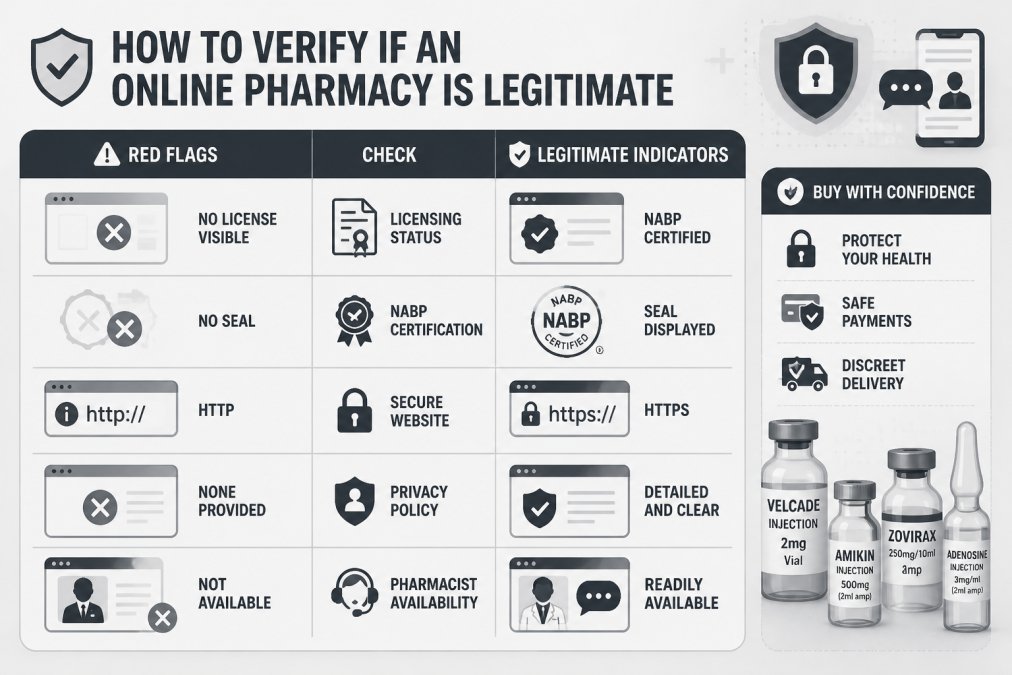
Start by checking for NABP (National Association of Boards of Pharmacy) accreditation. Legitimate pharmacies display a NABP seal on their website. You can also visit NABP's verified pharmacy directory to confirm a pharmacy's standing. This single check eliminates most fraudulent operations immediately.
Look for these specific indicators of a legitimate online pharmacy:
- Licensed pharmacist requirement: The site requires a valid prescription from a licensed prescriber before dispensing
- Secure website: The URL begins with "https://" and a padlock icon appears in your browser address bar
- Privacy policy: A clear, detailed privacy policy explains how your health information is protected
- Pharmacist consultation availability: Certified pharmacists are accessible via phone, chat, or email
- Physical address and phone number: Verifiable contact information, not just a web form
- Prescription verification: The pharmacy contacts your prescriber directly to confirm the prescription
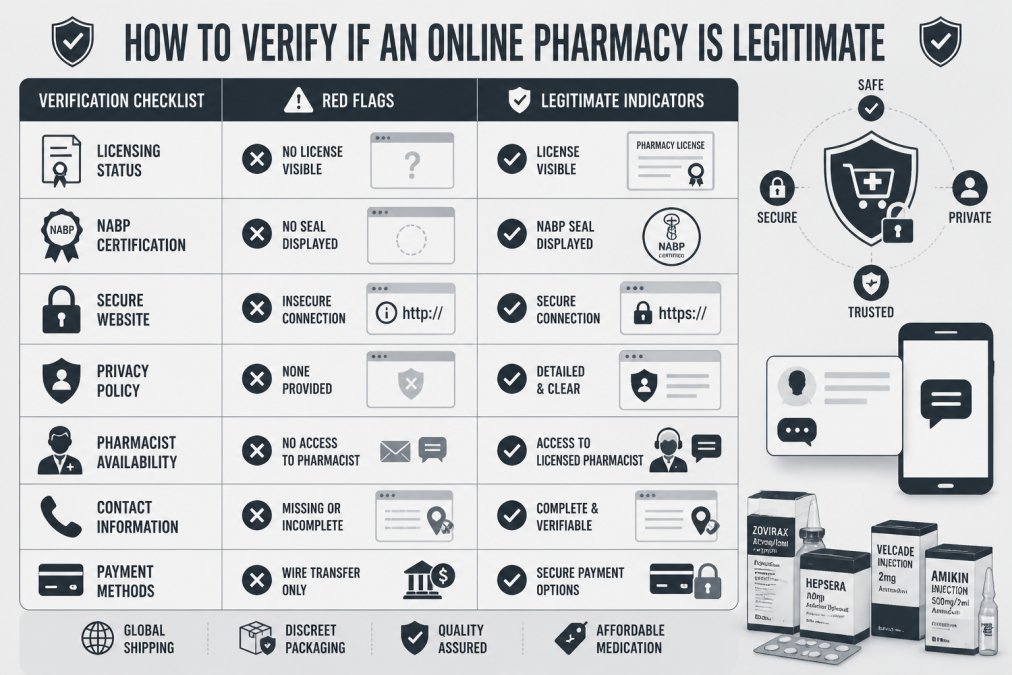
Be cautious of red flags: pharmacies offering medications without a valid prescription, sites with poor grammar or unprofessional design, unrealistically low prices, or operations that don't require prescriber information. These patterns often signal illegitimate operations that may dispense counterfeit or substandard medications.
Chemistway operates with transparent verification protocols, ensuring every prescription is reviewed by a certified pharmacist before dispensing.
Step 1: Gather Your Prescription Information
Before initiating a prescription transfer, compile the specific details your new online pharmacy will need. This preparation prevents delays and ensures accuracy.
Collect the following information for each medication:
- Medication name: The exact name of the drug (e.g., "metformin hydrochloride")
- Strength and dosage: The specific dose (e.g., "500 mg")
- Quantity: How many tablets or units per refill (e.g., "30 tablets")
- Frequency: How often you take it (e.g., "twice daily")
- Prescriber name and contact information: Phone number and fax number
- Current pharmacy name and location: Where you've been filling this prescription
- Refill authorization: Whether your prescriber has authorized future refills
- Insurance information: Provider, plan name, member ID, and group number (if applicable)
Having this information ready accelerates the transfer process significantly. Most online pharmacies can initiate a transfer within 24 hours once they receive complete prescriber details.
Step 2: Create Your Account and Verify Eligibility
Online pharmacies require account creation to manage your prescriptions, track orders, and maintain your medication history securely.
Start by visiting the pharmacy's website and selecting "Create Account" or "Register." You'll provide your full legal name, date of birth, email address, phone number, mailing address, and password.
After basic registration, the pharmacy verifies your identity and insurance eligibility. During this time, the pharmacy confirms your identity matches government records, your insurance plan is active and covers pharmacy benefits, and any prior authorization requirements for your specific medications.
Insurance Coverage and Copay Verification
Insurance coverage directly affects your out-of-pocket costs and which medications your plan covers. Understanding your formulary (the list of medications your insurance covers) prevents surprises at checkout.
Request your formulary from your insurance provider or check your plan's website. The formulary lists covered medications by tier:
- Tier 1 (Generic): Lowest copay, typically $5-15
- Tier 2 (Brand-name preferred): Higher copay, typically $20-50
- Tier 3 (Brand-name non-preferred): Highest copay, often $50+
- Not covered: Your plan doesn't cover the medication; you pay full price
Many patients discover that switching to a generic equivalent significantly reduces their copay. Your pharmacist can discuss generic alternatives with your prescriber if your current medication falls into a higher tier.
Chemistway's pharmacists handle prior authorization requests on your behalf, communicating directly with your insurance company to expedite approval.
Step 3: Request Your Prescription Transfer
Once your account is active and eligibility verified, initiate the prescription transfer. This step involves formal communication between your new online pharmacy and your current pharmacy or prescriber.
Most online pharmacies offer two transfer methods:
Method 1: Direct Pharmacy-to-Pharmacy Transfer Your new pharmacy contacts your current retail pharmacy directly. This method typically takes 24-48 hours.
Method 2: Prescriber Transfer Your new pharmacy requests the prescription directly from your prescriber's office. This method is necessary if your current pharmacy refuses to transfer or if you're establishing care with a new prescriber. Prescriber transfers may take 3-5 business days.
To initiate a transfer, log into your online pharmacy account and select "Transfer Prescription" or "Request Prescription." You'll enter your current pharmacy name and location, your prescriber's name and contact information, the specific medications you're transferring, and authorization to contact both parties on your behalf.
How Long Does Prescription Transfer Take
The prescription transfer timeline depends on several factors, but most transfers complete within 3-5 business days:
Day 1: You submit the transfer request. The pharmacy sends a formal transfer request to your current pharmacy or prescriber.
Days 2-3: Your current pharmacy or prescriber's office receives and processes the request. Retail pharmacies typically respond within 24 hours.
Day 4-5: Your new online pharmacy receives the transferred prescription information and verifies it matches your account details. The pharmacist reviews your medication for interactions.
Day 5-6: Once approved, the pharmacy notifies you that your prescription is ready for payment and processing.
Expedited transfers are possible. If you need medication urgently, contact your pharmacist immediately, they may coordinate with your prescriber for an emergency supply while the transfer processes.
Step 4: Work With Your Pharmacist to Review Your Medications
This step separates professional online pharmacies from automated dispensaries. A certified pharmacist should review your complete medication profile before your first order ships.
Your pharmacist will verify each medication's dose and frequency, check for drug-drug interactions, identify potential side effects based on your medical history, confirm appropriateness for your conditions, answer questions about how to take each medication, and discuss generic alternatives if your insurance doesn't cover a brand-name drug.
This consultation typically happens via phone or secure messaging within 24 hours of your transfer request. The pharmacist uses your medication history to understand your full clinical picture.
Chemistway's pharmacists are available 24/7 for these consultations, ensuring you can discuss your medications at a time that works for your schedule. If the pharmacist identifies a concern, such as a duplicate medication or a potential interaction, they contact your prescriber directly to resolve it before dispensing.
How to Transfer Prescription to Amazon Pharmacy and Other Platforms
Amazon Pharmacy operates as a mail-order pharmacy integrated with Amazon Prime membership. The transfer process is similar to other online pharmacies but includes Amazon-specific features.
To transfer prescriptions to Amazon Pharmacy:
- Create or log into your Amazon account
- Navigate to Amazon Pharmacy
- Select "Transfer a Prescription"
- Enter your current pharmacy name and location
- Authorize the transfer and provide your prescriber information
- Wait for the transfer to complete (typically 24-48 hours)
Amazon Pharmacy's main advantage is integration with Prime membership, offering free 2-day shipping on eligible prescriptions. However, Amazon Pharmacy's network is limited compared to independent online pharmacies. If your prescriber or medication isn't in their network, the transfer won't complete.
Other major platforms offering online prescription management include GoodRx (which aggregates prices across multiple pharmacies rather than dispensing directly) and various specialty pharmacy networks for high-cost medications.
The transfer process remains consistent across platforms: you provide your current pharmacy or prescriber information, authorize the transfer, and wait for verification and pharmacist review. The main variables are shipping speed, insurance network acceptance, and pharmacist availability.
Chemistway accepts transfers from any retail pharmacy or prescriber.
Step 5: Set Up Auto-Refill and Manage Your Medication Synchronization
Auto-refill eliminates the need to remember when your medications run out. This feature is particularly valuable for patients managing chronic conditions requiring long-term medication adherence.
Most online pharmacies offer automatic refill with customizable schedules. You specify your refill frequency (every 30 days, every 90 days, etc.), refill date, and notification settings (whether you want email or SMS alerts before the refill ships).
Auto-refill saves time and prevents gaps in medication access. Many patients set refills to arrive 3-5 days before they run out, ensuring continuous supply.
Medication synchronization aligns all your refill dates so multiple medications arrive together. Instead of managing separate refill schedules, synchronization delivers everything on the same day.
To set up synchronization:
- Log into your online pharmacy account
- Navigate to "Manage Refills" or "Auto-Refill Settings"
- Select the medications you want synchronized
- Choose a single refill date that works for your schedule
- Confirm the new delivery schedule
The pharmacy adjusts the fill dates for some medications to align with your chosen synchronization date. For example, if your blood pressure medication refills every 30 days but your diabetes medication refills every 90 days, the pharmacy fills the blood pressure medication more frequently to sync both with your chosen date.
You maintain complete control over auto-refill. You can pause refills temporarily, skip a month, adjust the frequency, or cancel auto-refill entirely through your account settings. If you need to stop a medication due to a prescriber change, pause the refill immediately to avoid receiving unwanted medication.
Chemistway's auto-refill system integrates with your prescription history and insurance information, automatically applying your copay or uninsured pricing at checkout. This automation reduces administrative burden while maintaining transparency about your costs.
Frequently Asked Questions
How do I know if an online pharmacy is legitimate and safe?
Look for NABP (National Association of Boards of Pharmacy) accreditation, a valid pharmacy license in your state, a licensed pharmacist available for consultation, and a secure website with HIPAA-compliant privacy practices. Legitimate online pharmacies require a valid prescription from your doctor, display contact information clearly, and never sell controlled substances without proper verification. Check state pharmacy board websites to confirm licensing.
How long does it take to transfer a prescription to an online pharmacy?
Prescription transfer typically takes 24-48 hours once your doctor's office sends the prescription electronically. Some online pharmacies offer expedited transfer within a few hours. After transfer, the pharmacy's pharmacist reviews your medications for interactions and safety, which adds 1-2 business days. Your first order may take longer if manual verification is needed. You can track your prescription status through your patient portal.
Do online pharmacies work with my insurance, and what about copays?
Most online pharmacies accept major insurance plans and can verify your coverage and copay amounts during account setup. Some offer lower prices for uninsured patients than your insurance copay. You'll need your insurance ID and group number to verify eligibility. The pharmacy's patient portal shows your formulary coverage and any prior authorization requirements. Contact your health plan or the online pharmacy's insurance team if you have questions about your specific coverage.
What if my doctor won't send my prescription to an online pharmacy?
Many doctors are unfamiliar with online pharmacy processes. Explain that the pharmacy is NABP-accredited and operates like a standard mail-order service. You can request your prescription in writing and transfer it yourself to the online pharmacy of your choice, your doctor doesn't need to send it directly. Alternatively, ask your doctor to send it electronically to the pharmacy's fax number. If your doctor refuses, you have the right to request your prescription records and transfer them elsewhere.
Managing your medications shouldn't require multiple pharmacy visits or complicated refill processes. Switching to an online pharmacy like Chemistway streamlines prescription management with 24/7 pharmacist access, automatic refills delivered to your door, and transparent pricing whether you have insurance or not. Create a free account today and experience how convenient professional online pharmacy care can be.
This article was written using GrandRanker


0 comments